Last updated:
Wireless Diagnosis
Laptop Wi-Fi and Bluetooth Repair in Malaysia
Wi-Fi not showing, constantly dropping or Bluetooth refusing to pair? We check airplane mode, the wireless key, drivers and your router first, then the wireless card and the antenna cables. If other devices connect fine and your laptop does not, the fault is on the laptop.
90-Day Warranty
Price
Quote after diagnosis
Repair time
Confirmed at diagnosis
Parts quality
Supplied by TechFix
Service
Laptop Wi-Fi and Bluetooth Repair
Quote after diagnosis
Signs You Need Wi-Fi and Bluetooth Repair
Recognize these symptoms? Your device may need professional repair.
No Wi-Fi Networks Listed
The Wi-Fi icon is missing or shows no networks, or Wi-Fi has disappeared from Settings altogether.
Keeps Dropping the Connection
Wi-Fi disconnects every few minutes, or only works next to the router, while other devices stay connected.
Slow Wi-Fi on This Laptop Only
Phones and other laptops are fast on the same network, but this laptop crawls.
Bluetooth Will Not Turn On or Pair
The Bluetooth switch is missing or greyed out, or devices pair and then disconnect.
Airplane Mode Stuck On
Airplane mode will not switch off, or the wireless function key does nothing.
Weak After a Knock, Hinge Work or Spill
The signal got worse after a drop, a bent lid, a hinge repair or liquid getting into the laptop.
Experiencing any of these issues?
Book AssessmentWhat Our Technicians Check
- The Wi-Fi adapter is missing from Device Manager under Network adapters, or shown with a warning, which points to the card or its connector
- The signal is strong only within a metre or two of the router, which points to a disconnected antenna cable
- Wi-Fi and Bluetooth are both missing together, a sign that the shared wireless card is not detected
- Other devices connect to the same network without trouble, which rules out the router and points to the laptop
- A driver reinstall or network reset helps briefly and the fault then returns, a sign of a failing card
🔧
Technician Insight
Before opening the laptop we rule out airplane mode, the wireless key, network adapter power-saving and a corrupted network stack, and we test on a second network or a phone hotspot so your router is not the suspect. If we open the laptop, we reseat the card and check both antenna connectors; the tiny clips that hold each antenna lead can come loose after a knock. Where the antenna wires run through the hinge, we check them together with the hinge.
— TechFix Laptop Specialist
Our Solution
Professional repair process using premium parts and expert technicians
Expert Diagnosis
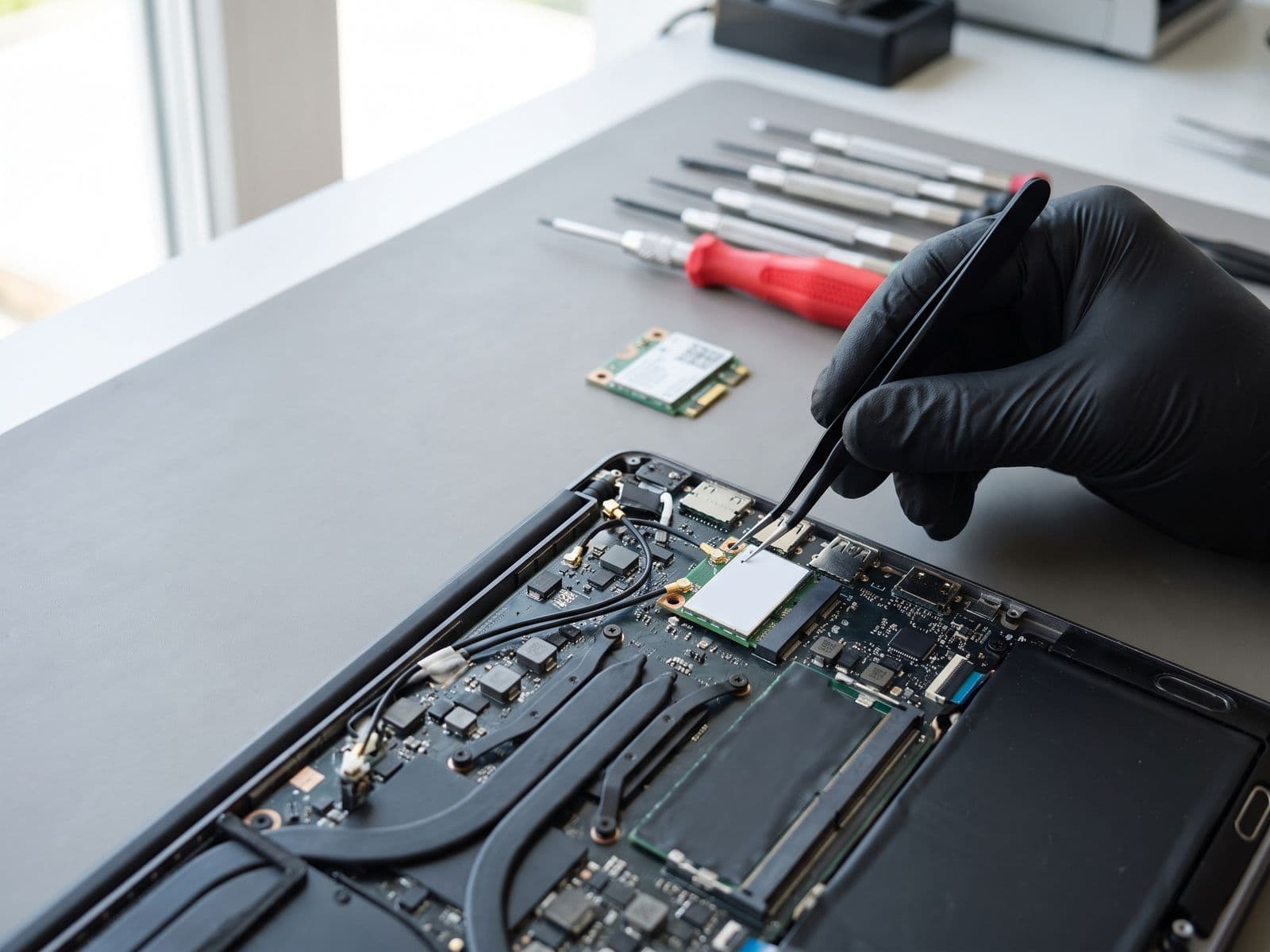
Wi-Fi and Bluetooth usually share one small wireless card inside the laptop, with two thin antenna cables that run up through the hinge into the lid. That is why both can fail together. We start with airplane mode, the wireless key, the network adapter driver, power-saving settings and your router, because they cause most problems. If the laptop still cannot connect while other devices can, we test the card, the antenna cables and their connectors. Diagnosis for a Windows laptop is RM100, waived when you approve the repair quote. The repair itself is quoted after diagnosis.
Premium Parts
TechFix supplies the replacement wireless card and antenna cables for your laptop model. We do not fit customer-supplied parts. A few models have the wireless chip soldered to the motherboard, which we confirm at diagnosis along with the price.
Quality Guarantee
Eligible repairs include our 90-Day Warranty. Covers eligible parts and labour.
What's Included
Airplane mode, wireless key and BIOS check
Wi-Fi and Bluetooth driver check
Power-saving and router-side checks
Wireless card inspection and reseat
Antenna cable and connector inspection
Wireless card replacement where it has failed
Connection and pairing test before hand-back
90-Day Warranty
❌
Before
- Damaged or malfunctioning device
- Reduced performance
- Frustration and downtime
- Risk of further damage
✅
After
- Fully functional device
- Restored to peak performance
- Peace of mind with warranty
- Premium quality parts
Transparent Pricing
No hidden fees. We quote after diagnosis, and no repair starts until you approve the quote.
Diagnosis fee for a Windows laptop: RM100, waived when you approve the repair quote.
Model / Service
Price
Warranty
Turnaround
Driver, airplane-mode and settings fix
Price:Quote after diagnosis
Warranty:Confirmed on final quote
Turnaround:After diagnosis
Antenna cable or connector repair
Price:Quote after diagnosis
Warranty:90-Day Warranty
Turnaround:After diagnosis
Wi-Fi and Bluetooth card replacement
Price:Quote after diagnosis
Warranty:90-Day Warranty
Turnaround:After diagnosis
Covers eligible parts and labour.
* Prices may vary based on specific model and condition. Contact us for exact quote.
Need it urgently? WhatsApp us to confirm current parts stock before visiting.
Our Repair Process
A streamlined process designed for your convenience and transparency.
1
Diagnosis
We check airplane mode, the wireless key, the network adapter driver and power-saving settings, and test on a second network so your router is not the suspect.
Done first
2
Quote
You get a quote for the fault we actually find. Nothing is replaced until you approve it.
Before any repair
3
Repair
We reseat or replace the antenna cables or the wireless card. If the hinge is damaged, it is quoted with the wireless work.
Confirmed at diagnosis
4
Testing
We test signal strength, a stable connection and Bluetooth pairing, and move the lid to confirm the signal no longer drops.
Before hand-back
Ready to start your repair journey?
Book NowWhy Choose Techfix
Malaysia's trusted device repair specialists with a track record of excellence.
Expert Technicians
Our technicians are highly trained with years of hands-on experience in device repair.
90-Day Warranty
Covers eligible parts and labour
Same Day, Parts Permitting
Many common repairs can be done the same day once parts are in stock. Walk in or book ahead for priority service.
Sunway Service Centre
Visit us at Sunway Geo Avenue or courier your device to us — we courier it back free.
90
Day Warranty
1
Sunway Centre
Frequently Asked Questions
Common questions about Laptop Wi-Fi and Bluetooth Repair
Why is my laptop Wi-Fi not working?
The usual causes are airplane mode or a wireless key, a network adapter driver that broke after an update, power-saving settings switching the adapter off, a disconnected antenna cable, a failing wireless card, or a problem with the router itself.
How do I tell whether it is the laptop or the router?
Try another device on the same network and try your laptop on a phone hotspot. If other devices connect and your laptop does not, the fault is on the laptop. If nothing connects to that network, the router or the internet line is the problem and a laptop repair will not help.
Why did Wi-Fi and Bluetooth stop at the same time?
On most laptops one wireless card handles both, so when the card is not detected, loses power or is stuck in airplane mode, both disappear together. A driver fault or a failing card can do the same.
Can you replace only the Wi-Fi card?
On most laptops the card is a small plug-in module that can be replaced on its own. On a few models the wireless chip is soldered to the motherboard. We confirm which applies to your model at diagnosis, before you approve anything.
How much does Wi-Fi or Bluetooth repair cost and how long does it take?
There is no fixed price: a driver fix, an antenna cable reseat and a card replacement are very different jobs, so we quote after diagnosis. Diagnosis for a Windows laptop is RM100, waived when you approve the repair quote. Turnaround and part availability are confirmed at diagnosis.
Will you reset Windows or erase my files?
Wi-Fi and Bluetooth faults are almost always solved without a Windows reset. If we ever found that a reinstall was the only fix, we would tell you first and say plainly that it erases data, so you can back up before we go ahead.
Why is my Wi-Fi weak even right next to the router?
A weak signal beside the router, while phones on the same network are fine, often points to a loose or disconnected antenna cable. The antenna wires run up through the hinge into the lid, and a drop or a hinge repair can leave one unclipped. Reseating or replacing the cable restores the signal; a driver update cannot fix a disconnected antenna.
Still have questions?
Our team is here to help. Chat with us on WhatsApp for immediate assistance.
Chat on WhatsAppVisit Our Service Center
Walk in at Sunway Geo Avenue or book ahead for priority service.
Cyberjaya customers can courier their device to us — we courier it back free.
Techfix Sunway
Sunway Geo Avenue, Bandar Sunway
G-06-28, Level 6, Block G, Sunway Geo Avenue, Jalan Lagoon Selatan, Sunway South Quay, Bandar Sunway, 47500 Subang Jaya, Selangor
Mon - Fri: 9AM - 6PM
Ready to fix your Laptop?
Book your wi-fi and bluetooth repair today. Same-day service available at our Sunway location.
Need it urgently? WhatsApp us to confirm current parts stock before visiting.
No deposit needed • Free to book • Pay only when you collect your device
90-Day Warranty
Covers eligible parts and labour
Expert Technicians
Highly trained team
Data Privacy
Your data stays safe
Quality Parts
Premium components
Resources & Care Tips
Learn how to maintain your device and prevent future issues with our expert guides
Quick Care Tips
Prevent Overheating
Keep ventilation clear and avoid using on soft surfaces
Regular Cleaning
Clean ports and surfaces monthly to prevent buildup
Software Updates
Keep your device updated for optimal performance
Related Articles
Ready to Fix Your Laptop?
Get professional wi-fi and bluetooth repair service today. Same-day repairs available at Sunway.
Need it urgently? WhatsApp us to confirm current parts stock before visiting.
90-Day WarrantyCovers eligible parts and labour.