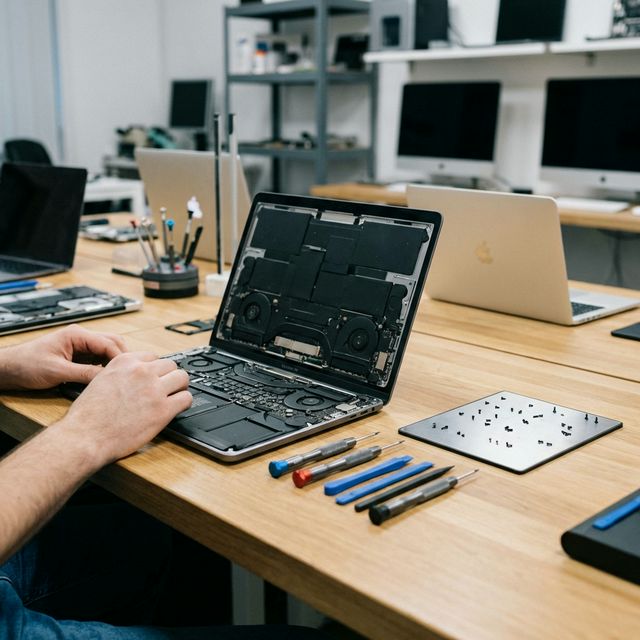
Still using a hard drive? An SSD upgrade is the #1 way to speed up an old laptop. Prices and benefits explained.
SSD Upgrade Malaysia: Make Your Old Laptop Faster Than New
If your laptop takes 5 minutes to boot, struggles to open Chrome with three tabs, or freezes when you copy files — you almost certainly do not need a new laptop. You need an SSD (Solid State Drive), and the difference it makes is significant enough that most customers describe it as getting a new computer.
This guide explains the difference between HDDs and SSDs, what the upgrade actually costs in Malaysia in 2026, and how the data migration process works so your laptop comes back with everything intact.
HDD vs SSD: What Actually Changes
Most laptops sold in Malaysia before 2019 — and many budget models sold after — shipped with traditional spinning hard drives (HDDs). Understanding what replaces them explains why the speed difference is so dramatic.
HDD (Hard Disk Drive)
- Uses spinning magnetic platters with a physical read/write head
- Typical read speed: 80–120 MB/s
- Boot time: 2–5 minutes depending on Windows version
- Fragile — drops and vibration damage the heads
- Heavy power draw, shortens battery life
SATA SSD (Solid State Drive)
- Flash memory chips, no moving parts
- Typical read speed: 450–550 MB/s (4-6x faster than HDD)
- Boot time: 10–20 seconds
- Shock resistant
- Lower power draw, better battery life
NVMe SSD (M.2 slot)
- Newer interface, available in most laptops from 2018 onward
- Read speeds: 2,000–5,000 MB/s
- Even faster boot and file operations
- Same physical durability as SATA SSD
Real-world differences you will notice immediately:
- Windows boot time drops from 3–5 minutes to under 20 seconds
- Chrome opens instantly instead of showing a blank white screen for 10 seconds
- File transfers between folders take seconds, not minutes
- The laptop is completely silent (no drive spin-up noise)
- Battery life improves by 30–60 minutes on average
SSD Upgrade Pricing in Malaysia (2026)
SSD prices have dropped significantly and continue to fall. These are installed prices including data migration:
| Capacity | SATA SSD (Installed) | NVMe SSD (Installed) | Best For |
|---|---|---|---|
| 256GB | RM 180 – RM 220 | RM 200 – RM 240 | Very light users, secondary devices |
| 512GB | RM 250 – RM 300 | RM 270 – RM 330 | Standard office/student use |
| 1TB | RM 350 – RM 430 | RM 380 – RM 470 | Gamers, creatives, media storage |
| 2TB | RM 550 – RM 680 | RM 600 – RM 750 | Heavy storage needs |
Note: Most laptops use either SATA (older models, 2.5" drive bay) or NVMe M.2 (most post-2018 models). Our technicians check your specific model before quoting — there is no guessing.
For MacBook SSD upgrades, pricing and the process is different — see our MacBook SSD upgrade page for model-specific information.
What Happens to Your Data?
This is the most common question we get, and the answer is: nothing bad. We clone your existing drive to the new SSD before discarding the old one.
The Cloning Process
- Assessment: We check your current drive health and available space
- Backup confirmation: We confirm you have a backup, or we create one
- Clone to new SSD: We use sector-level duplication software that copies Windows, all your installed programs, your files, browser profiles, passwords saved in Windows, desktop layout, and wallpaper — everything
- Test boot: We verify the laptop boots correctly from the new SSD
- Handover: You get your laptop back looking and feeling exactly the same, just dramatically faster
You do not need to reinstall Windows. You do not lose your programs. Your login passwords remain the same. The only thing that changes is speed.
What If My Drive Is Already Failing?
If your existing HDD is showing S.M.A.R.T errors or is in the early stages of failure (you may have heard clicking noises), cloning may not be 100% successful. In these cases:
- We attempt a partial clone to recover as much as possible
- Some files may need to be manually copied if sectors are damaged
- If the drive is completely unreadable, we discuss data recovery options separately
For this reason, we always recommend acting on slow performance before the drive fails rather than after.
Which Laptops Benefit Most?
The laptops that show the most dramatic improvement from an SSD upgrade are:
- Any laptop with a spinning HDD — the baseline speed improvement is massive
- Intel Core i5 or i7 (4th to 8th gen) — the processor is still capable; it is the storage holding it back
- Laptops with 8GB RAM — with an SSD, 8GB is adequate for general use; without one, 8GB RAM paired with a slow HDD makes everything feel sluggish
Even a 2014-era Intel Core i5 laptop with 8GB RAM and a new SSD will handle 2026 web browsing, Office 365, Zoom, and general productivity tasks without issue. That is a significant improvement for RM 250–RM 300 versus RM 2,500 for a new mid-range laptop.
When an SSD Upgrade Is Not Enough
An SSD upgrade addresses the storage bottleneck. It does not fix:
- CPU limitations — a very old or underpowered processor will still struggle with video encoding or large spreadsheets
- RAM shortfalls — 4GB RAM will still cause slowness in Chrome with many tabs, regardless of SSD
- Thermal throttling — a laptop that overheats will still throttle with a new SSD; thermal cleaning is needed alongside it
- Screen or keyboard damage — hardware damage needs separate repairs
If your laptop has other issues alongside slow performance, our laptop repair Malaysia service covers the full range of repairs and we can combine services at a discount.
Book Your SSD Upgrade at Techfix
Book online or walk in to our Sunway service centre. Bring your laptop in the morning and collect it in the afternoon — same-day service for most SSD upgrades.
Our technicians will confirm the exact drive type your laptop supports, quote you a firm price, and have it ready with all your data intact.
Sunway: G-06-28, Level 6, Block G, Sunway Geo Avenue WhatsApp: 017-355 5725