Professional MacBook logic board repair in Malaysia. Micro-soldering, component-level repair, and diagnostics for all MacBook models.
MacBook Logic Board Repair: Expert Service in Malaysia
A logic board failure is among the most serious — and most misdiagnosed — issues a MacBook can develop. Many devices labelled "dead" by Apple Authorised Service providers or other shops are brought to TechFix and successfully repaired at component level for a fraction of the replacement cost. This guide explains what logic board repair actually involves, what it costs in Malaysia, and how to know whether your MacBook is a candidate for it.
Logic Board Repair vs Replacement Costs
| Service | Cost Range |
|---|---|
| Diagnostic Assessment | Free |
| Component-Level Repair (single fault) | RM 400 - RM 800 |
| Power Circuit / PMIC Repair | RM 350 - RM 600 |
| USB-C / Charging IC Repair | RM 400 - RM 700 |
| Audio Codec Replacement | RM 300 - RM 550 |
| Full Logic Board Replacement | RM 1,200 - RM 2,500 |
Component-level repair saves 50-70% compared to full board replacement in most single-fault cases.
What Does "Logic Board Repair" Actually Mean?
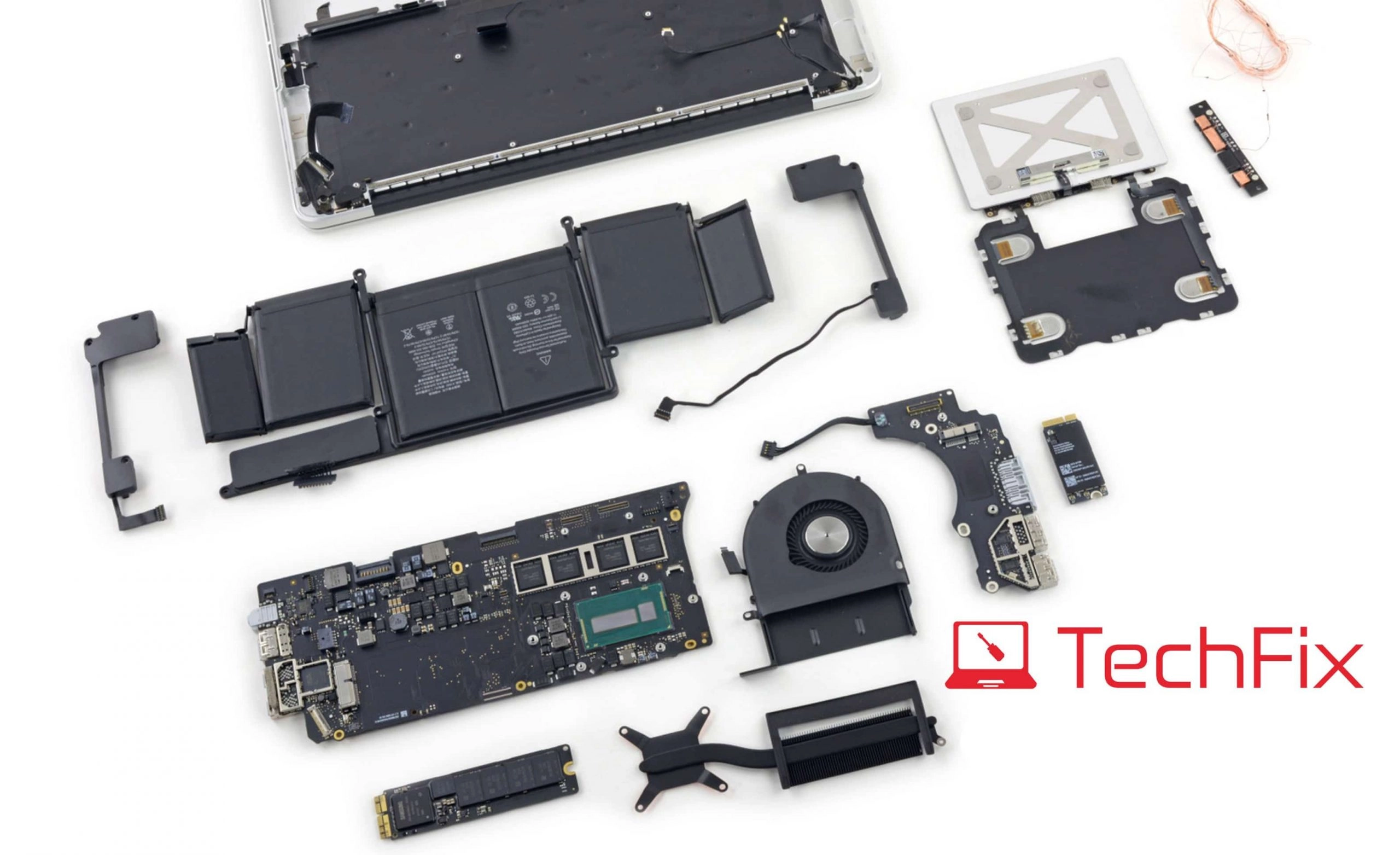
The logic board (Apple's term for what PC manufacturers call a motherboard) is the central circuit board that connects every component in your MacBook — CPU, GPU, RAM, storage, USB-C controllers, Thunderbolt, Wi-Fi, Bluetooth, and audio. In MacBooks manufactured from 2016 onwards, the RAM and SSD are soldered directly to this board, which means failures that used to be simple swap-outs now require component-level diagnosis.
Component-level repair means we do not replace the entire board. Instead, our technicians use professional microscopes, oscilloscopes, and micro-soldering equipment to identify the specific chip, capacitor, resistor, or trace that has failed — and replace only that part. Common repairs include:
- SMD (surface-mount device) component replacement — tiny resistors and capacitors that control power delivery
- IC chip replacement — removing and resoldering integrated circuit chips under a hot-air station
- BGA chip reballing — reflowing solder balls on chips that have cold joints from thermal stress
- Circuit trace repair — bridging or rerouting damaged copper traces on the board
This level of work requires Apple board schematics (obtained through legitimate repair industry channels), calibrated soldering equipment, and — critically — technicians who have done hundreds of these repairs. It is not something an IT shop that primarily does software installs can offer.
7 Signs of a Logic Board Problem
1. No Power — Completely Dead The MacBook shows no response whatsoever: no charging LED, no fan spin, nothing on the display. This is often a failed PMIC (Power Management IC) or a blown fuse in the power path — both repairable at component level in most cases.
2. Boots to a Black Screen The fan spins, you may hear a startup chime, but the display stays black. This can indicate a GPU failure, a display port IC problem, or a bad display connector. Our diagnostics distinguish between a faulty screen (cheaper fix) and a board-level display circuit fault.
3. Kernel Panics and Spontaneous Reboots macOS restarting without warning, or displaying a dark overlay saying "Your computer restarted because of a problem," indicates the system encountered a hardware error it couldn't recover from. Frequent kernel panics pointing to the same hardware component — especially memory — suggest a logic board fault.
4. USB-C / Thunderbolt Ports Not Working One or more Thunderbolt 3/4 ports that stopped charging or stopped recognising peripherals is almost always a USB-C controller IC failure. These chips are solderable replacements — common repairs that typically cost RM 400-700.
5. No Audio (Internal Speakers and Headphone Jack Both Silent) Audio that disappeared suddenly — not gradually — usually points to a failed audio codec chip on the logic board rather than a software driver issue. This is confirmed within minutes on diagnostics.
6. Wi-Fi and Bluetooth Disappeared "No hardware installed" for Wi-Fi in System Settings, or Bluetooth that simply won't turn on, can result from a failed BCM module or, in liquid damage cases, corrosion on the Wi-Fi/BT module connectors.
7. Random Freezing Under Load The MacBook works fine at idle but freezes during video editing, gaming, or compiling — tasks that push CPU and GPU to high utilisation — often indicates a power delivery issue where the voltage regulators cannot sustain current under load.
How We Diagnose Logic Board Faults
Effective board-level repair starts with accurate diagnosis. Many repairs fail or are misquoted because shops guess at the fault rather than measure it.
Our process:
1. Power-on diagnostics with custom Apple diagnostic tools. We use tools that run Apple's internal diagnostic suite, which often identifies failing components by name and error code.
2. Oscilloscope measurement of power rails. We probe each power domain on the board to confirm which voltage rails are present, absent, or out of specification. This is the most reliable way to distinguish a fuse failure from a PMIC failure from a short circuit.
3. Schematic-guided fault tracing. Using schematics specific to your logic board revision, we trace the fault to specific components before ordering any parts or performing any soldering.
4. Visual inspection under microscope. For liquid damage cases, we clean the board with isopropyl alcohol and inspect under magnification for corrosion on component pads, damaged traces, or shorted capacitors.
What Happens to Your Data During Logic Board Repair?
This is the question we get asked most: "Will I lose my data?"
In most cases, no. On MacBooks from 2016-2022, the SSD storage is a separate chip on the logic board. If we repair the board without replacing it, your data is untouched. On M1/M2/M3 MacBooks, the SSD is physically part of the Apple Silicon package — which means if a full board replacement is required (rare), data transfer requires Apple's proprietary migration path.
Our priority is always to preserve your data. Before starting any repair, we discuss data status with you. If the board cannot be repaired and you need data recovery first, we can attempt to read the NAND chips directly — a separate service starting at RM 500.
When Component Repair Is Not Possible
Not every logic board can be saved. Component repair is unlikely to succeed when:
- The board has been submerged in water (not just splashed) and corrosion has spread to multiple BGA chip pads
- The Apple Silicon package itself has failed (rare, but occurs in severe physical damage)
- Multiple chips have failed simultaneously in a pattern suggesting a power surge
- The physical PCB (the board substrate itself) is cracked or has broken traces that cannot be bridged
In these cases, we provide an honest assessment, explain exactly why repair is not viable, and offer a competitive quote for full logic board replacement if that is an economically sensible option given the MacBook's age and value.
Why Choose TechFix for Logic Board Repair
- Component-level capability — not just swap and replace, but actual fault isolation and micro-soldering repair
- Free, honest diagnostics — we tell you upfront whether repair is viable and what it will cost before you commit
- Board schematics and proper tools — oscilloscope, hot-air rework station, microscope, and Apple-specific diagnostics
- Data-first approach — we discuss your data situation before touching anything
- 90-day warranty — all logic board repairs covered on parts and workmanship
Book Your Logic Board Diagnosis
Do not give up on your MacBook before getting a proper diagnosis. Many devices we receive have been written off by other shops — and are repaired the same day for RM 400-700.
📍 Sunway: G-06-28, Level 6, Block G, Sunway Geo Avenue 📍 Cyberjaya: A-G-06, CoPlace 2, Jalan Usahawan 📞 WhatsApp: 017-355 5725 📧 Email: fix@techfix.my
Free diagnosis — only pay if we fix it.
For board-level issues caused by spills, see our dedicated MacBook logic board repair page, or if liquid damage is suspected, water damage repair may be the right starting point.