Learn when your iPad battery needs replacement, costs in Malaysia, and expert tips to extend battery life. Complete guide for all iPad models.
iPad Battery Replacement: Complete Malaysia Guide
Is your iPad battery draining faster than it used to? Battery degradation is the most common reason older iPads start feeling sluggish or unreliable — and it is almost always fixable. This guide explains the signs, costs, and process for iPad battery replacement in Malaysia, with practical advice from TechFix technicians who handle dozens of iPad battery swaps every week.
iPad Battery Replacement Costs in Malaysia (2026)
| iPad Model | Battery Replacement Cost | Turnaround |
|---|---|---|
| iPad 7th-10th Gen | RM 300 - RM 400 | 2-3 hours |
| iPad Air 3/4/5 | RM 350 - RM 450 | 2-3 hours |
| iPad mini 4/5/6 | RM 320 - RM 420 | 2-3 hours |
| iPad Pro 11" (all gens) | RM 400 - RM 500 | 2-3 hours |
| iPad Pro 12.9" (all gens) | RM 450 - RM 550 | 2-3 hours |
All prices include parts, labour, and a 90-day warranty. Walk-ins welcome.
6 Signs Your iPad Battery Needs Replacement
1. Rapid Battery Drain A healthy iPad should last 8-10 hours of typical use. If you're getting 3-4 hours from a full charge, the battery's capacity has degraded significantly. This is normal after 2-3 years of daily use in Malaysia's heat.
2. Unexpected Shutdowns at 15-30% This is a classic sign of a battery that can no longer deliver consistent voltage under load. The device shuts down not because it's truly out of charge, but because the battery can't supply the current that demanding tasks (video, AR, multitasking) require.
3. Slow or Interrupted Charging If your iPad takes 4-5 hours to charge when it used to take 90 minutes, the battery cells may be struggling to accept current efficiently. This can also be caused by a faulty cable or charging port, which our expert diagnosis will differentiate.
4. Battery Health Below 80% Apple added battery health monitoring to iPadOS. Check it at Settings → Battery → Battery Health. Apple's own threshold for recommending service is 80% maximum capacity. Below this point, the battery cannot reliably deliver peak performance.
5. Physical Swelling — Act Immediately If your iPad screen is lifting at the edges, feels unusually thick, or the device is visibly bulging, this is a swollen battery. Stop using the device and do not attempt to charge it. Bring it to us immediately — swollen lithium batteries are a fire hazard. We handle this as a priority repair.
6. Excessive Heat During Light Use Some warmth during video streaming or gaming is normal. But if your iPad gets uncomfortably warm just browsing the web or reading, the degraded battery is working harder than it should to maintain charge, generating more heat in the process.
How Long Should an iPad Battery Last?
Apple designs iPad batteries to retain 80% of their original capacity after 1,000 complete charge cycles. For most users, this translates to roughly 3-5 years before a replacement makes sense.
However, Malaysian conditions affect this timeline:
Heat accelerates degradation. Lithium batteries age faster at high temperatures. If your iPad regularly sits in a warm bag, on a sun-exposed desk, or near kitchen appliances, expect to hit the 80% threshold earlier — sometimes as soon as 2 years.
Charging habits matter. Keeping your iPad constantly at 100% or frequently draining it to 0% before charging both accelerate cell wear. The healthiest range is 20-80%. Enable Low Power Mode (Settings → Battery) to reduce the frequency of full charge cycles.
iPadOS performance throttling. Unlike iPhones, Apple does not currently apply the same CPU throttling to older iPads with degraded batteries. But a weak battery still causes more shutdowns and slower performance under load due to voltage instability.
How the Battery Replacement Works at TechFix
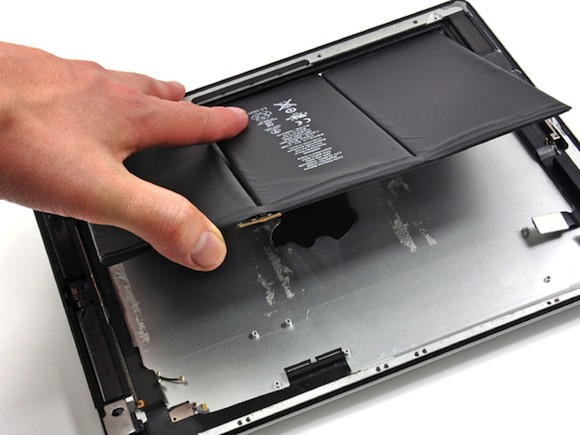
iPad battery replacement is more involved than iPhone battery replacement because the battery is bonded beneath the display assembly with strong adhesive. Our process:
1. Expert Diagnostic Assessment We check battery health, capacity, and cycle count. We also inspect the charging port and display while we have the device, so you get a complete health picture at no charge.
2. Careful Display Removal Using controlled heat, we soften the adhesive seal around the display perimeter and carefully lift the screen — keeping all ribbon cables intact. The screen is not replaced unless it was already damaged.
3. Battery Extraction and Replacement The old battery is removed along with its adhesive strips. A high-capacity replacement cell (matched to your specific iPad model and generation) is installed with fresh adhesive and the original connectors.
4. Reassembly and Seal The display is reseated, new adhesive applied around the perimeter, and the chassis sealed. The iPad's original water resistance is restored where applicable.
5. Calibration and Testing We run a partial charge cycle, verify the battery percentage reads correctly, and test for heat and charging speed before returning your device.
6. 90-Day Warranty All iPad battery replacements carry a 90-day warranty on parts and workmanship from TechFix.
Tips to Extend Your New Battery's Lifespan
After replacement, these habits will help your new battery last longer:
- Avoid leaving your iPad in hot environments — parked cars, direct sunlight on a table, or beside cooking appliances. Even 30 minutes at 50°C damages battery chemistry.
- Use a original Apple or MFi-certified charger. Cheap chargers from Shopee or Lazada often deliver unstable voltage, which degrades battery management hardware over time.
- Enable Optimized Battery Charging (Settings → Battery → Optimized Battery Charging). iPadOS learns your routine and avoids holding the charge at 100% longer than necessary.
- Keep Background App Refresh off for apps you don't need updating constantly (Settings → General → Background App Refresh).
- Update iPadOS regularly. Apple ships battery efficiency improvements with most point releases.
iPad Battery Safety Warning
If your iPad battery is visibly swelling — screen lifting, device feels thick or spongy:
- Stop using and charging the device immediately
- Do not attempt to puncture, pry, or remove the battery yourself — swollen lithium batteries can ignite when punctured
- Store it away from flammable materials until you can bring it in
- Call or WhatsApp us — we will advise on safe transport if needed
Swollen batteries in tablets are more dangerous than in phones because the larger cell holds more energy. We treat these as emergency repairs and have the equipment to safely discharge and remove compromised cells.
Why Choose TechFix for iPad Battery Replacement
- iPad-specific expertise — we repair iPads daily across all generations
- Quality replacement cells — high-capacity batteries matched to your model
- Same-day service — most replacements completed within 2-3 hours
- 90-day warranty — covers both the cell and the installation workmanship
- Free battery health check — even if you just want to know the status, we'll check it for free
Book Your iPad Battery Replacement
📍 Sunway: G-06-28, Level 6, Block G, Sunway Geo Avenue 📍 Cyberjaya: A-G-06, CoPlace 2, Jalan Usahawan 📞 WhatsApp: 017-355 5725 📧 Email: fix@techfix.my
Free battery health check with every visit. No appointment needed.
See our full model pricing on the iPad battery replacement service page — includes iPad Pro, Air, mini, and standard models.